---
updatedAt: 2026-10-22T04:00:00.000Z
agentTools:
projectIndex: https://developer.zealid.com/llms.txt
---
# ZealiD CSC 2QR API in detail
# Preliminaries
## Integration checklist
1. API credentials are required:
* `client_id`
* `client_secret`
* `account_id` (for generating `account_token`)
2. Base ZealiD (“Hermes”) backend URL is required:
* Testing environment: `https://hermes-dev.zealid.com`
* Production environment: `https://core-hermes.zealid.com`
| Environment | Base URL+CSC prefix | Example of full URL |
| :-------------------- | :------------------------------------------------ | :---------------------------------------------------- |
| Production (live) | | |
| Testing (integration) | | |
> 📘 Get API credentials
>
> Contact for API credentials
> 🚧 Use correct subdomain:
>
> * **core-hermes** - production environment
> * **hermes-dev** - testing environment
## ZealiD apps for integration
| Environment | Android | iOS |
| :-------------------- | :--------------------------------- | :--------------------------------- |
| Production (live) | In Google App Store | In Apple App Store |
| Testing (integration) | Contact: | Contact: |
> 🚧 Please note
>
> It is advised to have one ZealiD app per mobile device. When installing a new build (different environment), it is recommended to uninstall the previous build first.
## Inventory of related specs
Related documentation for reference (not mandatory for integration):
1. CSC API v1 spec:
2. RFC 6749, The OAuth 2.0 Authorization Framework:
3. RFC 7521, Assertion Framework for OAuth 2.0 Client Authentication and Authorization Grants:
* Section 4.2, Using Assertions for Client Authentication:
* RFC 7521 additional signature-based assertions currently not used
# Flow Diagram
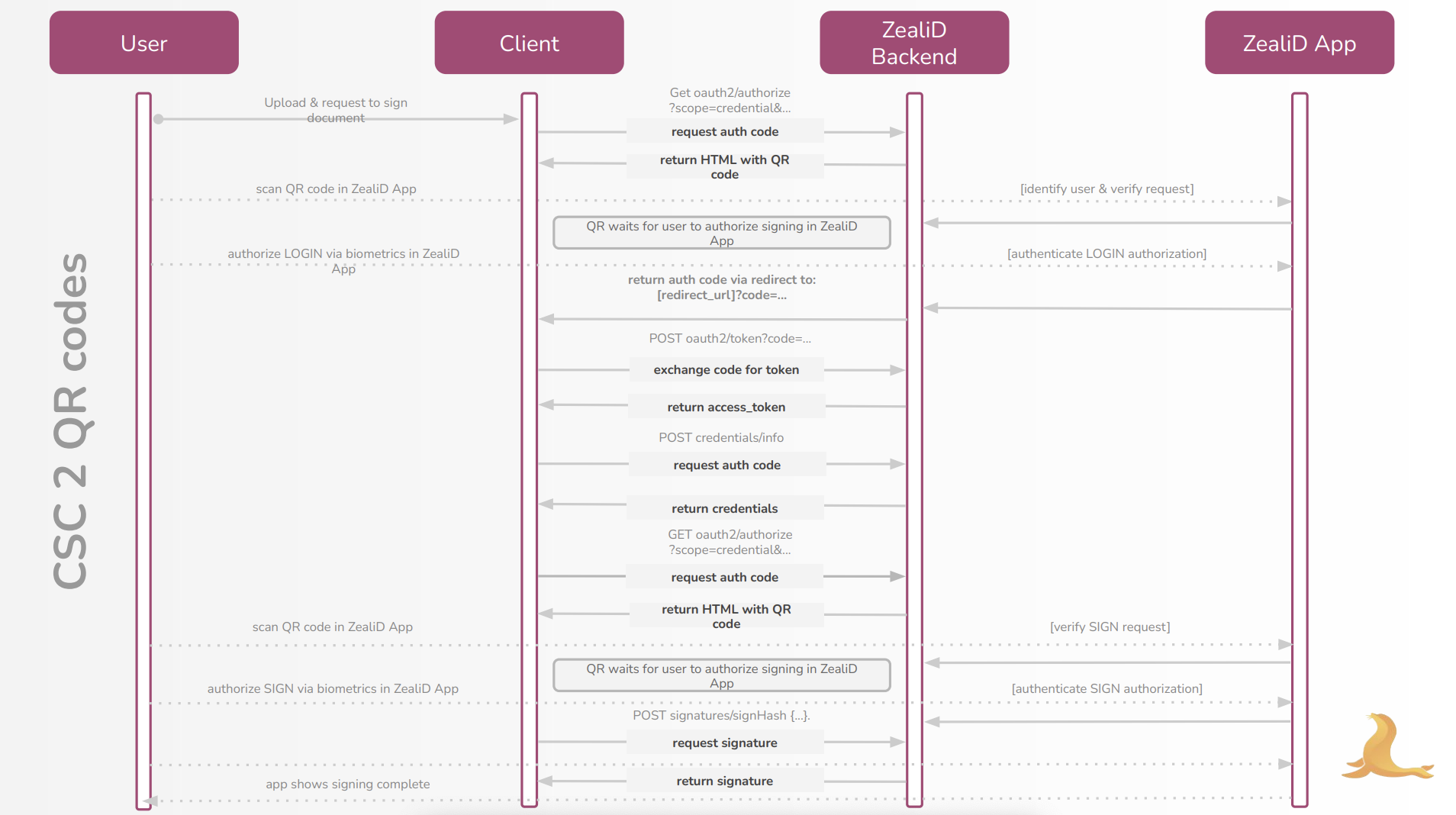
# CSC endpoints
**Endpoint, parameter, sample request and response listing is provided below. Please first read additional important notes:**
## Billing
* If additional information is not provided, the client integrating and calling the API is the one to be billed
* However, the client may sometimes need to act as a partner facilitating other client companies (which are to be the billable entity)
* CSC-spec-compatible parameter is to be used for this purpose, in this instance: `clientData`. You do not pass it in the initial `oauth2/authorize` call (because no client authentication takes place at that point - i.e. data is not reliable, trust-wise), but it can be passed as an optional parameter to the subsequent POST `oauth2/token` call
* If this parameter is not passed, it is assumed that the calling party is the actual billable entity
* If this additional parameter is passed, it is understood that this ID is to be billed; ZealiD saves this ID as well
## CSC endpoint API notes
* oauth2 (not oauth) general structure is used, to conform to CSC v1. Here is the reference CSC v1 spec which we're using as our basis:
* Note the endpoint call-order (currently there are 5 different endpoints): these should normally be called in the order as given:
* `info`
* `authorize` with `scope=service`
* `oauth2/token` (to get access token)
* `credentials/list`
* `credentials/info`
* `authorize` with `scope=credential`
* `oauth2/token` (to get SAD - second token, for `signHash`)
* `signHash`
* `oauth2/revoke`
* Input parameter names (variables) always match CSC spec
* Where possible, descriptions are adapted from the CSC spec and modified as necessary
* Input parameter list is in some cases ZealiD-specific, so please use this documentation as the definitive ZealiD CSC reference
* CSC mixes `underscore_based` and `camelCase` parameter names, please be aware when integrating
* CSC spec references are included; whenever there is a possible divergence, notes are included
* You need to call signHash after redirect in a limited amount of time as otherwise signing transaction (and the SAD) will expire
* Note from CSC spec: "NOTE 4: Although RFC 3986 doesn’t define length limits on URIs, there are practical limits imposed by browsers and web servers. It is RECOMMENDED not to exceed an URI length of 2083 characters for maximum interoperability." (p. 20)
## account\_token
`account_token` is mandatory for service-scope authorization (i.e. the first `authorize` call for the first QR code).
`account_token` is to be built from `account_id`, as per CSC 1.0.4.0 spec, section 8.3.1 *Restricted access to authorization servers*:
The account\_token parameter is based on a JSON Web Token (JWT), defined as follows, according to the RFC 7519:
```
account_token = base64UrlEncode() + "." + base64UrlEncode() + "." +
base64UrlEncode()
```
Components of the above are defined as:
Header:
```
= {
"typ": "JWT",
"alg": "HS256"
}
```
Payload:
```
= {
"sub": "",
"iat": ,
"jti": "", "iss": "", "azp": ""
}
```
Signature:
```
= HMACSHA256(
base64UrlEncode() + "." +
base64UrlEncode(),
SHA256()
)
```
## JWT signature within account\_token
Note regarding JWT signature: the secret must be passed in as a binary digest of the SHA256 hash of the client secret (`jwt_secret=sha256(client_secret).digest()`).
**Please make sure the JWT conforms to its spec (RFC 7519)** (pay particular attention to urlsafe-base64 encoding - see: ).
**Please also make sure the JWT signature within JWT (JWS) conforms to JWS spec (RFC 7515).** Internally, it is an HMAC, but the encoding is important.
**You can use the online tool to validate the format of your JWT and the JWS within JWT** (you don't need to put in your client\_secret, just put in your token - the tool will tell you whether it's correctly encoded, including its signature).
## Good to know
* We use Natural Persons Semantics Identifier (ETSI 319 412-1)
* Our Common Name is compiled from Name, Surname and Serial Number; currently and by default, Serial Number follows ETSI 319 412-1 5.1.3
# ZealiD CSC 2QR API endpoints
## Info
[API reference for developers](https://developer.zealid.com/reference#info)\
Returns information about the remote service and the list of the API methods it\
supports
Example request:
```curl
curl https://hermes-dev.zealid.com/api/v3.0/csc/v1/info
-X GET
-d @- << EOF
EOF
```
Example response
```json
{
"authType": [
"oauth2code"
],
"description": "ZealiD Qualified eSignature",
"lang": "en-US",
"logo": "https://hermes-dev.zealid.com/static/img/inline-logo.png",
"methods": [
"info",
"oauth2/authorize",
"oauth2/token",
"signatures/signHash",
"credentials/info",
"oauth2/revoke",
"credentials/list"
],
"name": "ZealID Trust Services",
"oauth2": "https://hermes-dev.zealid.com/api/v3.0/csc/v1",
"region": "LT",
"specs": "1.0.4.0"
}
```
## Authorize
[API reference for developers](https://developer.zealid.com/reference#authorize)\
Initiate an OAuth 2.0 authorization flow.\
`CSC spec reference 8.3.2 in CSC v1`
> 📘 Required input
>
> *QUERY PARAMS*
>
> * **scope** (string/mandatory) must be set to “credential” or "service". First call must use "service" (login authorization), second call must use "credential" (signing authorization).
> * **response\_type** (string/mandatory) the value shall be “code”.
> * **client\_id** (string/mandatory) the unique `client ID` previously assigned to the client by the remote service (ZealiD).
> * **redirect\_uri** (string/optional) the URL where the user will be redirected after the authorization process has completed. Only a valid URI preregistered with the remote service (i.e. which starts with the base URL preregistered with ZealiD) SHALL be passed. If omitted, the remote service will use the default redirect URI pre-registered by the client.
> * **state** (string/optional) Optional string (up to 255 characters) which will be passed back to client after eventual redirect to error or success page
> * If **scope** is set to "service":
> * **account\_token** (string/mandatory) account token generated according to CSC spec.
> * If **scope** is set to "credential":
> * **credentialID** (string/mandatory) the unique identifier associated to the credential. Returned in credentials/list.
> * **numSignatures** (int/mandatory) the number of signatures to authorize. Must be an integer matching the number of hashes.
> * **hash** (string/mandatory) one or more base64url-encoded hash values to be signed. Multiple hash values can be passed as comma separated values, e.g. oauth2/authorize?hash=bjQLnP+zepicpUTmu3gKLHiQHT+zNzh2hRGjBhevoB0=,lqKW0iTyhcZ77pPDD4owkVfw2qNdxbh+QQt4YwoJz8c=,… (The parameter name is singular “hash” to match CSC spec).
Example request with scope=service
```curl
curl https://hermes-dev.zealid.com/api/v3.0/csc/v1/oauth2/authorize?
response_type=code&
client_id=$OAuth2_client_id&
redirect_uri=$OAuth2_redirect_uri&
scope=service&
account_token=$account_token
-X GET
```
Example request with scope=credential
```curl
curl https://hermes-dev.zealid.com/api/v3.0/csc/v1/oauth2/authorize?
response_type=code&
client_id=$OAuth2_client_id&
redirect_uri=$OAuth2_redirect_uri&
scope=credential&
credentialID=$credential_id&
numSignatures=1&
hash=bjQLnP+zepicpUTmu3gKLHiQHT+zNzh2hRGjBhevoB0=
-X GET
```
Example response
```http
HTTP/1.1 302 Found
Location: ?code=HS9naJKWwp901hBcK348IUHiuH8374&
```
## Token
[API reference for developers](https://developer.zealid.com/reference#token-1)\
Obtain an OAuth 2.0 access token\
`CSC spec reference 8.3.3 in CSC v1`
> 📘 Required input
>
> *HEADERS*\
> **Content-Type** (string) should be "application/json"
>
> *BODY PARAMS*
>
> * **grant\_type** (string/mandatory) the grant type, which depends on the type of OAuth 2.0 flow. Must be set to “authorization\_code”
> * **code** (string/mandatory) the authorization code returned by `oauth2/authorize` query parameter during redirect. It SHALL be bound to the client identifier and the redirection URI.
> * **client\_id** (string/mandatory) the unique `client ID` previously assigned to the client by the remote service (ZealiD).
> * **client\_secret** (string/mandatory) this is the `client secret` previously assigned to the client by the remote service (ZealiD).
> 📘 Expected output
>
> * **access\_token** (string) the short-lived OAuth 2.0 access token
> * **token\_type** (string) type of the token
> * **expires\_in** (int) the lifetime in seconds of the token
Example request:
```curl
curl https://hermes-dev.zealid.com/api/v3.0/csc/v1/oauth2/token
-X POST
-H "Content-type: application/json"
-d @- << EOF
{
"grant_type": "authorization_code",
"client_id": "$client_id",
"code"="$authorization_code",
"client_secret"="$client_secret"
}
EOF
```
Example response:
```json
{
"access_token": "hermes_token_3XlFQZ3ndFhkXf9P24/CKN69L8gdSYp5H3XlFQZ3ndFhkXf9P2",
"token_type": "SAD",
"expires_in": 300,
}
```
## Credentials list
[API reference for developers](https://developer.zealid.com/reference/credentials-list)\
Returns list of credential IDs to be used for retrieving certificates and signing hashes with.\
`CSC spec reference 11.4 in CSC v1`
> 📘 Required input
>
> *HEADERS*\
> **Authorization** (string) "Bearer $access\_token" where `access_token` - the token returned in `oauth2/token`
>
> **Content-Type** (string) should be "application/json"
> 📘 Expected output
>
> * **credentialIDs** (array of strings) the unique identifier associated to the credential
Example request:
```curl
curl https://hermes-dev.zealid.com/api/v3.0/csc/v1/credentials/list
-X POST
-H "Content-type: application/json"
-H "Authorization: Bearer $access_token"
-d @- << EOF
EOF
```
Example response:
```json
{
"credentialIDs": [
"cust_GX0112348"
]
}
```
## Credentials Info
[API reference for developers](https://developer.zealid.com/reference#credentials-info)\
Returns information on a signing credential, its associated certificate and a description of the supported authorization mechanism.\
`CSC spec reference 11.5 in CSC v1`
> 📘 Required input
>
> *HEADERS*\
> **Authorization** (string) "Bearer $access\_token" where `access_token` - the token returned in `oauth2/token`\
> **Content-Type** (string) should be "application/json"
>
> *BODY PARAMS*
>
> * **credentialID** (string/mandatory) the `credential_id` returned in `credentials/list` (the unique identifier associated to the credential.)
> * **certificates** (string/optional) specifies which certificates from the certificate chain shall be returned in certs/certificates. “none” - no certificate SHALL be returned. “single” - only the end entity certificate SHALL be returned. “chain” - the full certificate chain SHALL be returned. Default is "single".
> * **certInfo** (string/optional) request to return various parameters containing information from the end entity certificate. Default is false.
> * **authInfo** (string/optional) request to return various parameters containing information on the authorization mechanisms supported by this credential. Default is false.
> 📘 Expected output
>
> * **key** (dictionary):
> * **status** (string) the status of the signing key of the credential:\
> • “enabled”: the signing key is enabled and can be\
> used for signing.\
> • “disabled”: the signing key is disabled and cannot be\
> used for signing. This MAY occur when the owner\
> has disabled it or when the RSSP has detected that\
> the associated certificate is expired or revoked.
> * **algo** (array of strings) the list of OIDs of the supported key algorithms. For\
> example: 1.2.840.113549.1.1.1 = RSA encryption, 1.2.840.10045.4.3.2 = ECDSA with SHA256.
> * **len** (int) the length of the cryptographic key in bits.
> * **cert** (dictionary):
> * **status** (string) the status of validity of the end entity certificate.
> * **certificates** (array of strings) one or more Base64-encoded X.509v3 certificates from\
> the certificate chain. If the certificates parameter is “chain”, the entire certificate chain is returned\
> with the end entity certificate at the beginning of the array. If the certificates parameter is “single”, only the end entity certificate is be returned. If the certificates parameter is “None”, this value is not returned.
> * **issuerDN** (string) the Issuer Distinguished Name from the X.509v3 end entity certificate as UTF-8-encoded character string according to RFC 4514. This value is returned when certInfo is “true”.
> * **serialNumber** (string) the Serial Number from the X.509v3 end entity certificate represented as hex-encoded string format. This value is returned when certInfo is “true”.
> * **subjectDN** (string) the Subject Distinguished Name from the X.509v3 end entity certificate as UTF-8-encoded character string, according to RFC 4514. This value is returned when certInfo is “true”
> * **validFrom** (string) the validity start date from the X.509v3 end entity certificate as character string, encoded as GeneralizedTime (RFC 5280) (e.g. “YYYYMMDDHHMMSSZ”). This value is returned when certInfo is “true”.
> * **validTo** (string) the validity end date from the X.509v3 end entity certificate as character string, encoded as GeneralizedTime (RFC 5280) (e.g. “YYYYMMDDHHMMSSZ”). This value is returned when certInfo is “true”
> * **authMode** (string) specifies one of the authorization modes. For more information also see section 8.2 in CSC v1 4.0:\
> • “implicit”: the authorization process is managed by the remote service autonomously. Authentication factors are managed by the RSSP by interacting directly with the user, and not by the signature application.\
> • “explicit”: the authorization process is managed by the signature application, which collects\
> authentication factors like PIN or One-Time Passwords (OTP).\
> • “oauth2code”: the authorization process is managed by the remote service using an OAuth 2.0 mechanism based on authorization code as described in Section 1.3.1 of RFC 6749 ss .
> * **multisign** (int) a number equal or higher to 1 representing the maximum number of signatures that can be created with this credential with a single authorization request (e.g. by calling credentials/signHash method, as defined in section 11.9 in CSC v1\
> , once with multiple hash values or calling it multiple times). The value of numSignatures specified in the authorization request SHALL NOT exceed the value of this value.
> * **lang** (string) the lang as defined in the Output parameter table in section 11.1 in CSC v1 s]
Example request:
```curl
curl https://hermes-dev.zealid.com/api/v3.0/csc/v1/credentials/info
-X POST
-H "Authorization: Bearer $access_token"
-H "Content-type: application/json"
-d @- << EOF
{
"credentialID": "cust_GX0112348",
}
EOF
```
Example response:
```json
{
"key":
{
"status": "enabled",
"algo": [ "1.2.840.113549.1.1.1", "0.4.0.127.0.7.1.1.4.1.3" ],
"len": 2048
},
"cert":
{
"status": "valid",
"certificates":
[
"",
"",
""
],
"issuerDN": "",
"serialNumber": "5AAC41CD8FA22B953640",
"subjectDN": "",
"validFrom": "20180101100000Z",
"validTo": "20190101095959Z"
},
"authMode": "explicit",
"multisign": 5,
"lang": "en-US"
}
```
## Sign Hash
[API reference for developers](https://developer.zealid.com/reference#sign-hash)
Calculate a raw digital signature from one or more hash values. ZealiD only supports SHA256.
`CSC spec reference 11.9 in CSC v1`
> 📘 Required input
>
> *HEADERS*\
> **Content-Type** (string) should be "application/json"
>
> *BODY PARAMS*
>
> * **credentialID** (string/mandatory) the `credential_id` returned in `oauth2/token`
> * **SAD** (string/mandatory) the `access_token` returned in second `oauth2/token` request
> * **hash** (array of strings/mandatory) one or more hash values to be signed. This parameter SHALL contain the Base64-encoded raw message digest(s). The hash list must match the initial set of hashes passed via `oauth2/authorize`
> 📘 Expected output
>
> * **signatures** (array of strings) one or more Base64-encoded signed hash(s). In case of\
> multiple signatures, the signed hashes will be returned in the same order as the corresponding hashes provided as an input parameter.
Example request:
```curl
curl https://hermes-dev.zealid.com/api/v3.0/csc/v1/signatures/signHash
-X POST
-H "Content-type: application/json"
-d @- << EOF
{
"credentialID": "cust_GX0112348",
"SAD": "hermes_token_asdf",
"hash": [
"bjQLnP+zepicpUTmu3gKLHiQHT+zNzh2hRGjBhevoB0=",
"lqKW0iTyhcZ77pPDD4owkVfw2qNdxbh+QQt4YwoJz8c="
]
}
EOF
```
Example response:
```json
{
"signatures": [
"KedJuTob5gtvYx9qM3k3gm7kbLBwVbEQRl26S2tmXjqNND7MRGtoew==",
"Idhef7xzgtvYx9qM3k3gm7kbLBwVbE98239S2tm8hUh85KKsfdowel=="
]
}
```
## Revoke
[API reference for developers](https://developer.zealid.com/reference#revoke)\
Revoke an OAuth 2.0 access token\
`CSC spec reference 8.3.5 in CSC v1`
> 📘 Required input
>
> *HEADERS*\
> **Authorization** (string) "Bearer $access\_token" where `access_token` - the token returned in `oauth2/token`\
> **Content-Type** (string) should be "application/json"
>
> *BODY PARAMS*
>
> * **token** (string) the `access_token` returned in `oauth2/token`
Example request:
```curl
curl https://hermes-dev.zealid.com/api/v3.0/csc/v1/oauth2/revoke
-X POST
-H "Authorization: Bearer $access_token"
-H "Content-type: application/json"
-d @- << EOF
{
"token": "$access_token",
}
EOF
```
Example response:
```http
HTTP/1.1 204 No Content
```